Require an NDA or licence before people sign in
Some apps should not open until a person has agreed to something. If your app signs people in through Signet as its OAuth provider, Signet can ask first. It keeps a record of exactly what each person accepted.
What a person seesWhat you set upThe recordWhere Signet checksNot OAuth consentOther ways to do itLimits
Who it is for
What a person sees
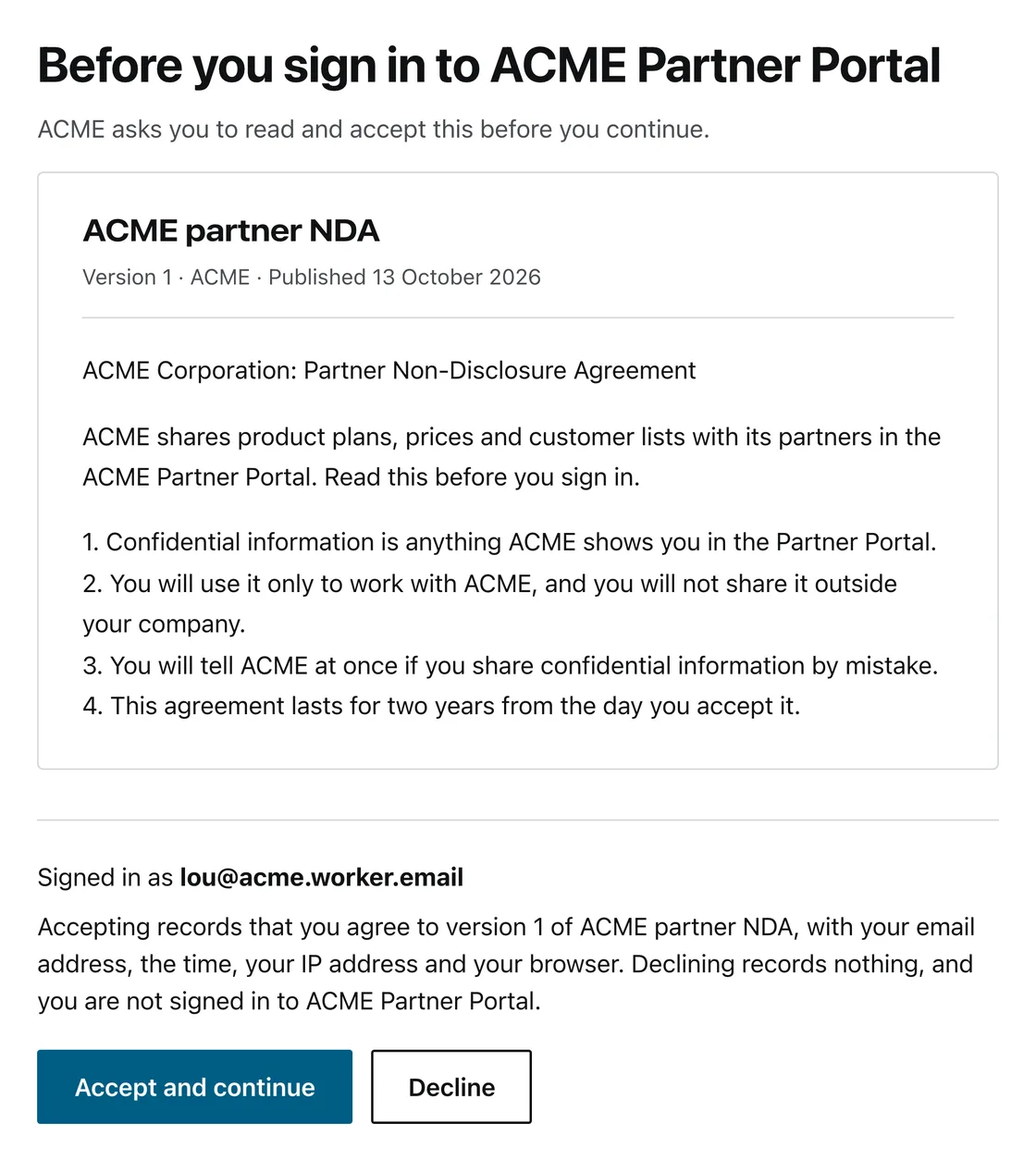
They sign in as usual. Before the app gets anything, Signet shows a page with the agreement’s title, version and full text. It also shows the email address they signed in with, and a line saying what accepting records. Then two buttons: Accept and continue, and Decline.
Record of acceptance
- Accepted by
- lou@acme.worker.email
- Agreement
- ACME partner NDA
- Version
- 1
- SHA-256 of the text shown
- aa7ef4b7 00557c4f 8d3dcb31 af737cef
13b0b8fa 60b8d396 81226ae7 ed1d4c60 - When, by the server’s clock
- 13 Oct 2026, 11:30 UTC
Also kept: the app, the IP address and the browser.
If they accept, they go on into the app, through the usual consent screen if the app needs one. If they decline, Signet records nothing. A plain line tells them they are not signed in and can come back any time.
When you publish a new version, Signet asks again at their next sign-in or token refresh. So does an acceptance that reaches its renewal date. The page tells them why.
What you set up
- Attach one agreement or several to an app, from the operator dashboard or the admin API.
- Change the text and you publish a new version, which asks everyone again. Publishing the same text again changes nothing, so a system that syncs on every save never asks twice.
- Turn on renewal if you want it: ask again after a set number of days.
- Did someone already accept the same text in another system? Record that acceptance with the hash of the text, and Signet does not ask them again.
The record
Every acceptance writes one record. You can list the records and export them as CSV.
If you delete the person’s account later, the record stays. Signet clears the user id and keeps the rest.
Where Signet checks
The check is not only on the sign-in page. Signet runs it each time it issues or renews a token for the app:
- browser sign-in
- the code exchange that follows it
- device sign-in, for TVs and command-line tools
- token refresh
- signed assertions from another system (the jwt-bearer grant)
So a new version also reaches people who signed in before you published it. Signet asks them at their next sign-in or token refresh.
Not OAuth consent
Consent is about the app: what it may read about the person. The agreement is about the person: their own statement that they accept your terms. Signet keeps the two apart, and revoking an app’s consent removes no acceptance.
Other ways to do it
Do the people who must accept already sign in through Microsoft Entra ID? Then use Entra’s built-in terms of use. They need an Entra ID P1 licence (Microsoft’s terms of use guide, checked 11 Oct 2026).
Auth0 documents it as something you build. A post-login Action sends people to a terms page you make (Redirect with Actions, checked 11 Oct 2026).
In Signet it is a setting on each app, with versions, optional renewal and an export of the record.
Limits
- It covers apps that get their tokens from Signet as their OAuth provider. An app that signs people in with Signet’s session cookies directly, without OAuth, does not ask for the agreement.
- Only apps that belong to an organisation can require an agreement. Instance-wide apps cannot yet.
- One Accept button accepts every agreement on the page. Signet still records each one on its own.
- A person cannot withdraw an acceptance yet.
- Organisation owners and admins manage agreements through the operator dashboard or the admin API. Signet has no self-service page for them yet.
- It is an evidence trail, not legal advice. You decide whether a click is enough for your agreement.
Set it up
The developer guide has the admin API calls and the CSV columns. It also says what your app receives at each place Signet issues a token.